
Get started
Before you begin the onboarding process, ensure you meet the following requirements:
1. District agreement
To begin using Danske Bank Premium APIs, the first step is to have access to a District agreement - either an existing one or order a new, and either registered as the owner of the District agreement or added as a third party.
2. Digital Certificate
A qualified digital Network certificate is required, which is used for mTLS to prove the validity of customer's public key. The qualified digital certificate could be of either QWAC or EV type.
Welcome to Danske Bank's Premium APIs. This page contains a guide to help integrate with Danske Bank Premium APls.
Danske Bank offers the following Premium APIs:
- Premium APIs - Non-regulatory, API-based services accessible through the Danske Bank API Platform, available for corporate account information and partners.
- Mock service - A quick way to test Premium APIs before onboarding, using example-based responses and occasional random errors to help validate error handling.
A list of Premium APIs can be found here.
All APIs adhere to the latest OpenAPI Specification, which can be found at here. Detailed technical specifications for each API are available in the reference sections. The API URLs for Production and Sandbox testing are described in the Endpoints section.
Basic Terminology
A network certificate is an x509 certificate used for mutual TLS between Danske Bank and the party invoking its APIs. This digital document secures communications between clients and servers, verifies ownership of a public key, and ensures that the party communicated with over the network is trustworthy. This is crucial for maintaining data integrity and privacy, preventing man-in-the-middle attacks and other security breaches.
A customer at Danske Bank refers to any individual or business entity that has entered into a legal agreement to use any of the Danske Bank's services or products.
Quick Start Guide
To begin using Danske Bank's Premium APIs, please follow the onboarding process outlined below:
- Get a Digital Certificate. Obtain a qualified digital Network certificate (e.g. QWAC or EV) required for mTLS to verify your organisation's identity.
- Set up District access and sign agreements. Contact Danske Bank, order the required District modules, and sign the necessary agreements.
- Upload certificate and assign permissions within District. Upload digital certificate for validation and assign relevant mandates to District users.
- Register and subscribe to APIs. Once the certificate is approved, create a project and subscribe to required APIs.
- Start using the APIs. Use ClientID and certificate to authenticate and begin integrating with the APIs.
Get a Digital Certificate
To register on the API Platform, a qualified digital Network certificate is required for mTLS to validate the customer's public key. Danske Bank endorses two types of certificates:
- eIDAS Qualified Website Authentication Certificate (QWAC) (eIDAS - The Ecosystem)
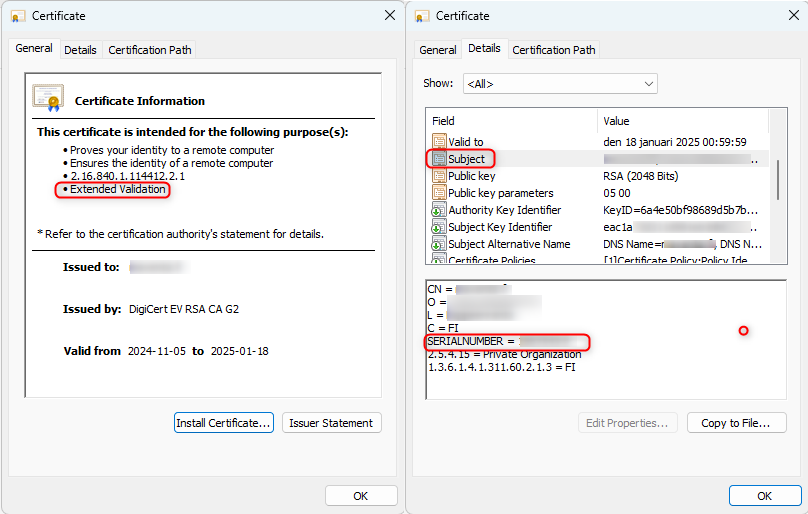
- Extended Validation (EV) (Normally indicated with the OID 2.23.140.1.1 in x509 specification)
In the cryptography, a public key certificate, also referred to as a digital certificate or identity certificate, is an electronic document that establishes the authenticity of a public key. This certificate contains the public key itself, details about the key, and information regarding the identity of its owner (referred to as the subject), along with the digital signature of an entity (known as the issuer) that has confirmed the accuracy of the certificate's contents. Danske Bank trusts all QWAC certificate issuers and most EV type certificate issuers. Examples of currently supported CAs - Buypass, DigiCert, GlobalSign, Sectigo, Entrust.
The certificate, crucial for verifying identities and encrypting data, ensure that communication remains confidential and integral during transactions on the External API platform.
- Ensure that the SERIALNUMBER field in the Subject of your certificate matches the official company identification number used for KYC onboarding with Danske Bank (e.g., Business ID in Finland, CVR in Denmark, Organisation Number in Norway and Sweden), and that this same number is linked to your District agreement.
Is this helpful?
On This Page